Data Engineering Path · Airflow

XCom — Cross-Communication Between Tasks
🔗 Sharing Data Between Tasks with XCom
XCom (short for "Cross-Communication") is Airflow's mechanism for tasks to exchange small messages and metadata. It is stored in the metadata database and is a core concept for building data-aware pipelines.
How XCom Works
sequenceDiagram
    participant T1 as Task: extract
    participant DB as Metadata DB (XCom Table)
    participant T2 as Task: transform

    T1->>DB: xcom_push(key="file_path", value="s3://bucket/data.csv")
    T1->>DB: xcom_push(key="row_count", value=50000)
    Note over T1,DB: Task 1 pushes metadata

    T2->>DB: xcom_pull(task_ids="extract", key="file_path")
    DB-->>T2: "s3://bucket/data.csv"
    T2->>DB: xcom_pull(task_ids="extract", key="row_count")
    DB-->>T2: 50000
    Note over DB,T2: Task 2 pulls metadata
XCom with Traditional Operators
def extract_data(**kwargs):
    """Extract data and push metadata to XCom."""
    data = fetch_from_api()

    # Push to XCom explicitly
    kwargs['ti'].xcom_push(key='row_count', value=len(data))
    kwargs['ti'].xcom_push(key='file_path', value='s3://bucket/output.csv')

    # Return value is automatically pushed as XCom with key='return_value'
    return {"status": "success", "records": len(data)}


def transform_data(**kwargs):
    """Pull XCom values from upstream task."""
    ti = kwargs['ti']

    row_count = ti.xcom_pull(task_ids='extract', key='row_count')
    file_path = ti.xcom_pull(task_ids='extract', key='file_path')
    extract_result = ti.xcom_pull(task_ids='extract')  # Gets return_value

    print(f"Processing {row_count} rows from {file_path}")
XCom with TaskFlow API (Recommended)
@dag(schedule="@daily", start_date=datetime(2024, 1, 1), catchup=False)
def data_pipeline():

    @task()
    def extract() -> dict:
        """Return value is automatically XCom."""
        return {"file": "s3://bucket/data.csv", "rows": 50000}

    @task()
    def transform(metadata: dict) -> dict:
        """Input parameter automatically pulls from XCom."""
        print(f"Processing {metadata['rows']} rows from {metadata['file']}")
        return {"status": "transformed", "rows": metadata['rows']}

    @task()
    def load(result: dict):
        print(f"Loading {result['rows']} rows")

    # XCom passing is completely automatic
    raw = extract()
    transformed = transform(raw)
    load(transformed)

data_pipeline()
🚨 Caution — XCom Size Limits
XCom values are stored in the metadata database. Do NOT pass large datasets (DataFrames, raw files) through XCom. This will bloat your database and cause performance issues.
✅ Pass through XCom: File paths, row counts, status flags, small JSON configs (< 48 KB)
❌ Don't pass through XCom: DataFrames, CSV contents, raw API responses (> 48 KB)
XCom values are stored in the metadata database. Do NOT pass large datasets (DataFrames, raw files) through XCom. This will bloat your database and cause performance issues.
✅ Pass through XCom: File paths, row counts, status flags, small JSON configs (< 48 KB)
❌ Don't pass through XCom: DataFrames, CSV contents, raw API responses (> 48 KB)
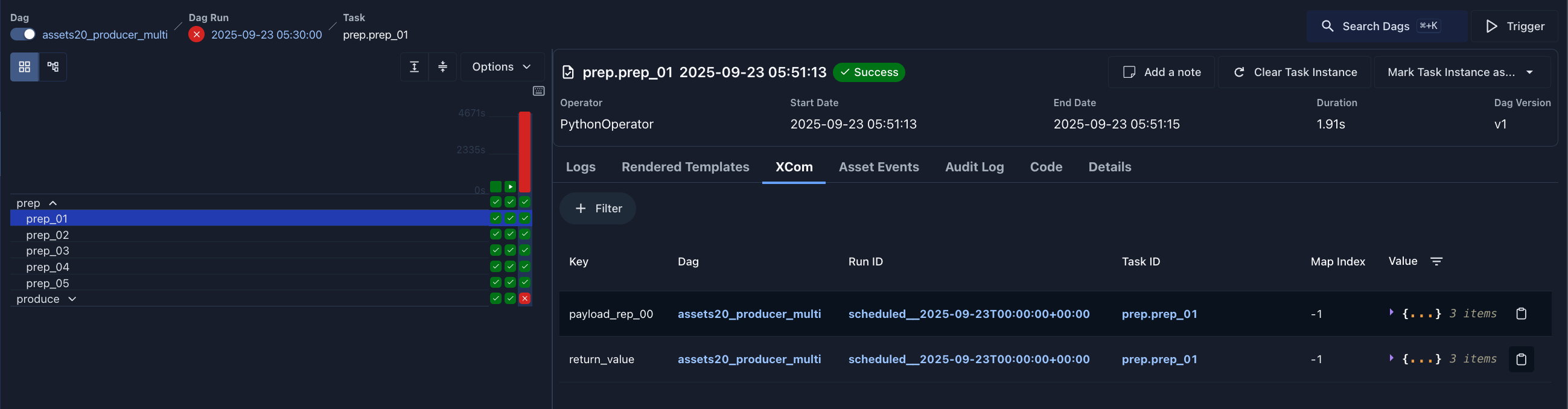
Inspecting XComs in the Web UI
During DAG execution, you can view the values pushed to XCom for each task run by clicking on the task in the Graph/Grid view and choosing the XComs tab: